1UMUS has finally released the highly awaited ClockTuner Utility for Ryzen processors and can now be downloaded. The highly anticipated tool helps to improve the efficiency of the Zen 2 based processors and also helps deliver increased performance for Zen 2 Ryzen processors. This innovative software takes the task of fine-tuning AMD Ryzen processors based on Zen2 architecture out of consumers’ hands.
First unveiled in August, the ClockTuner Utility has been fine-tuned for AMD Ryzen CPUs and has been designed to increase the performance of Zen 2 based processors that include Ryzen 3000 & 3rd Gen Ryzen Threadripper CPUs without increasing the power consumption. In some cases, it even decreases power consumption while increasing performance.
The ClockTuner for Ryzen works by adjusting the clock speeds and voltage for each CCX group automatically. Technically, the more CCXs the processor has, the higher the chance of finding the best core cluster. Threadripper processors are most likely to get better results because of their higher core and CCX count, and they feature up to 16 CCXs.
1USMUS has also provided proper support and instructions for the support. 1USMUS has recommended the following settings for BIOS, software settings, and updates:
- Windows 10 x64 1909-2004 build and newer (type ‘winver’ in start menu reveal your OS build)
- AMD Ryzen processor with Zen 2 architecture (Renoir is momentarily not supported);
- BIOS with AGESA Combo AM4 1.0.0.4 (and newer);
- .NET Framework 4.6 (and newer);
- CPU Voltage – Auto (BIOS);
- CPU Multiplier – Auto (BIOS);
- Ryzen Master 2.3 (uses the driver for monitoring) – (download)
- Stable RAM overclocking or stable XMP.
- SVM mode (Virtualzation) — disabled (BIOS).
The following settings are recommended for Load Line Callibration (LLC) for different motherboard manufacturers.
- ASUS – LLC 3 or LLC 4;
- MSI – LLC 3;
- Gigabyte – in most cases Turbo, but it can also be Auto;
- ASRock is Auto or LLC 2; Importantly, CTR is mediocre compatible with ASRock motherboards, as all LLC modes show abnormally high Vdroop;
- Biostar – Level 4+.
It is recommended to use additional settings for ASUS motherboard owners:
- Phase mode – Standard;
- Current capability mode – 100%;
The list of currently compatible processors was also provided by 1USMUS.
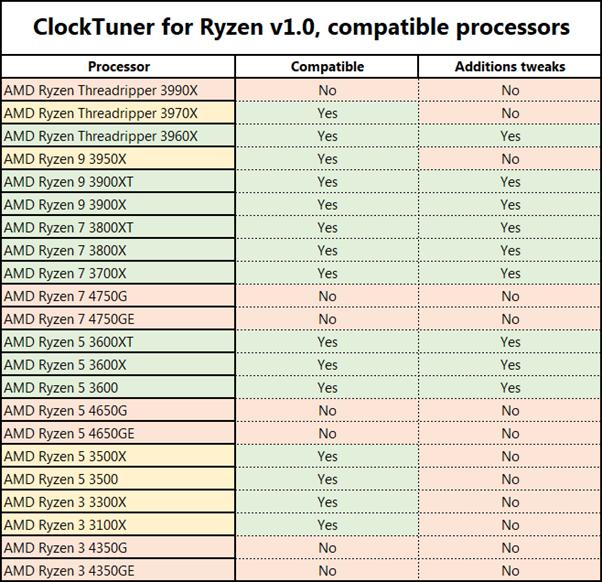
To run the ClockTuner for Ryzen, Download the CTR archive (Download link) and unpack it. Download and install Ryzen Master 2.3 (from here) and Cinebench R20 (from here) Archive and extract the archive contents to the “CB20” folder (this folder is located in the CTR folder). Run Cinebench R20, accept the license agreement, close Cinebench R20. The process after installation is completely automated so users won’t have to worry that much.