With rising RAM and SSD prices, a gaming laptop seems like a good option to purchase at this point. It is also a good option if you do not want to purchase each component separately and just want something that delivers a solid performance right out of the box. Today, I am here with a review of the Lenovo Legion 5 16IAX10, the 2025 version of the long-running Legion gaming laptop series by Lenovo. While the Lenovo Legion 5 16IAX10 is primarily a gaming laptop, my review will not only cover its performance in video games but also consider whether it is suitable for daily office work, such as for video editors, photographers, and architects, whose work demands a higher-end system as well.
Laptop Specifications:
Starting with the very basics, these are the on-sheet specifications of the Lenovo Legion 5 16IAX10 that I purchased. I am also adding the drivers, Windows’ version, and other details at the time of this review.
- OS: Windows 11 Home 64-Bit (10.0, Build 26200)
- System Model: 83NX
- BIOS: Q6CN26WW
- Processor: Intel Core Ultra 9 275HX (16 Cores, 24 Threads), 2.7 GHz, 36MB cache, Max Turbo up to 5.4GHz
- RAM: 32 GB SO-DIMM DDR5 (2×16)
- GPU: Nvidia GeForce RTX 5060 8GB GDDR7 Laptop GPU (Driver Version: 32.0.15.9144)
- Integrated GPU: Intel Graphics (Driver Version: 32.0.101.6629
- NPU: Integrated Intel AI Boost, up to 13 TOPS
- Sound: Audio Chip: High Definition (HD) controlled by Realtek ALC3306 codec, Studio Speakers by HARMAN, optimized with Nahimic Audio, 2W x2
- Storage: 1 TB NVMe out of the box, Expandable up to 2 TB, 2x NVMe slots
- Weight: 45 KG (5.4 lbs)
- Battery: 80 Wh, Ships with 245W Slim Tip (3-Pin) charger
- Camera: 5 MP with E-shutter
 What’s in the Box?
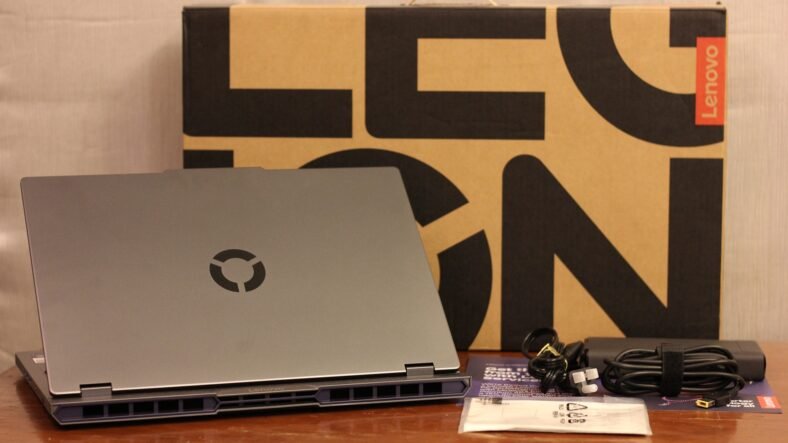
Hardware unboxing used to be something back in the early 2000s. Now, the unboxing experience has become somewhat dull, as the hardware only ships with basic accessories, and you only get the essentials right out of the box. The same applies to the Lenovo Legion 5 16IAx10. When you open its sustainable card box, it comes with:
- Lenovo Legion 5 16IAx10 laptop
- A Charging Cable
- A Power Adapter
- Documentation
 Screen:

The Lenovo Legion 5 16IAX10 ships with a 16” WQXGA 2K IPS panel, which features Anti-glare technology. It has a refresh rate of 240Hz, which is excellent for gaming, and is 100% DCI-P3, has HDR 400 support along with Dolby Vision, G-SYNC, and Low Blue Light. If you have been using an OLED screen before, I know that an IPS panel will not satisfy your needs, but this works for the better because the Lenovo Legion 5 16IAX10 can offer better features in a price range where an OLED-screen laptop cannot. Since OLED panels are expensive, if you are going for a gaming laptop with an OLED screen, you will find specs that fall way behind when compared with the Lenovo Legion 5 16IAX10, so having an IPS screen is a great choice for this laptop.

16” is a decent size for a laptop, and with 2K resolution and HDR, you will be looking at crisp and clear visuals, whether you are playing a game or editing a video. I am not going to argue here and compare the screen with OLED panels because OLED is superior to IPS, but for the price and the specs I am getting with the Lenovo Legion 5 16IAX10, it makes it a no-brainer. Having an OLED in this laptop would have pushed its price significantly, and at higher price points, having an 8GB GPU for gaming makes no sense. As of now, I have not come across a time when I thought that maybe this screen panel could have been better, because everything looks amazing on it.
Keyboard:
As a video game journalist, a keyboard is a vital component of every computer that I need because I type more than I play games. I type news features, and I type reviews. My main work is typing and not playing games, so I need to carefully consider hardware that comes with a keyboard that is comfortable to type on for hours, whether that is a normal desktop PC keyboard or a laptop keyboard. Lenovo Legion 5 16IAX10 comes with a 24-Zone RGB keyboard that sacrifices the right CTRL key for a Co-Pilot key. I never use Co-Pilot, so this is a major negative point of the laptop for me. Having a separate AI key makes more sense rather than sacrificing a useful key for it.
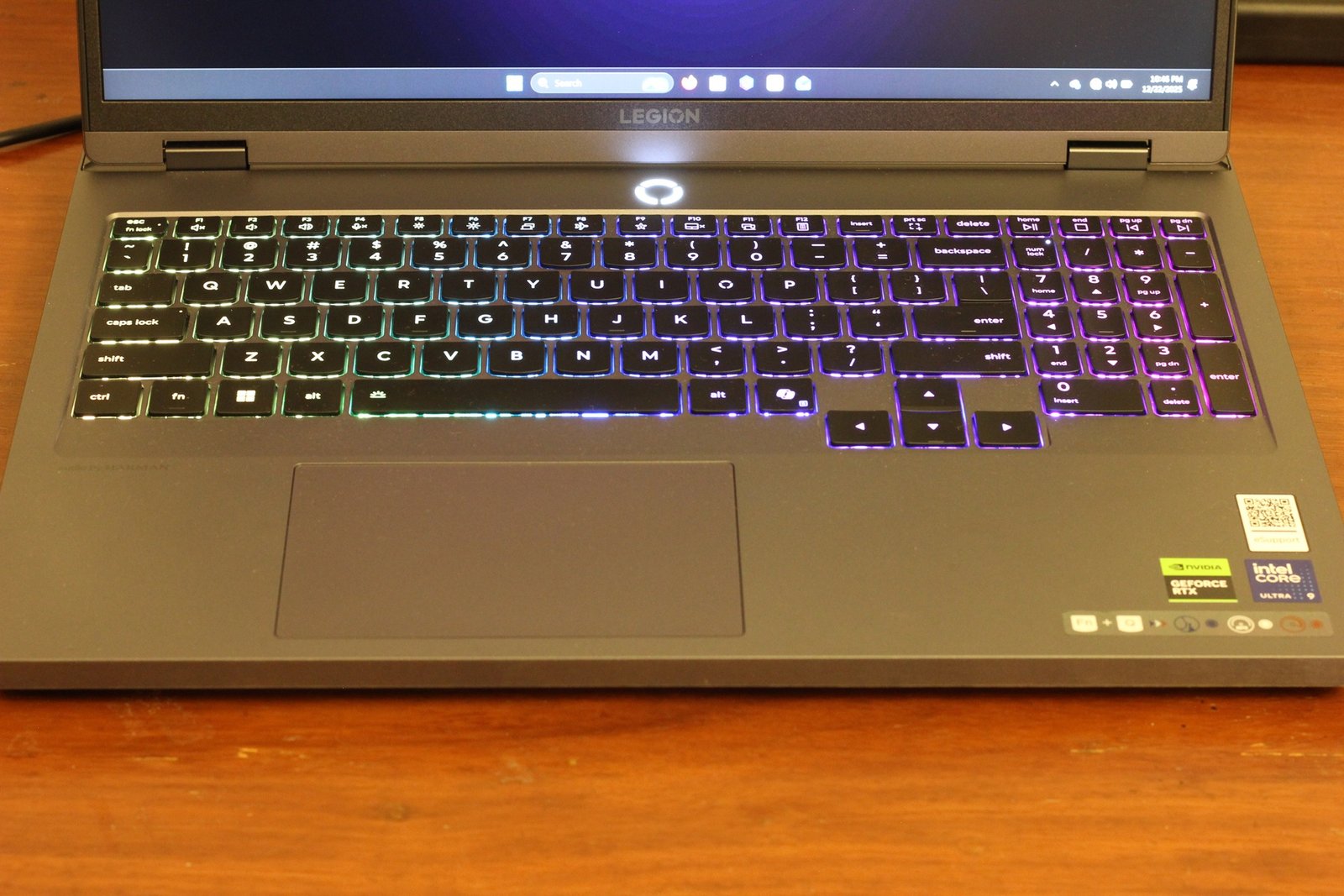
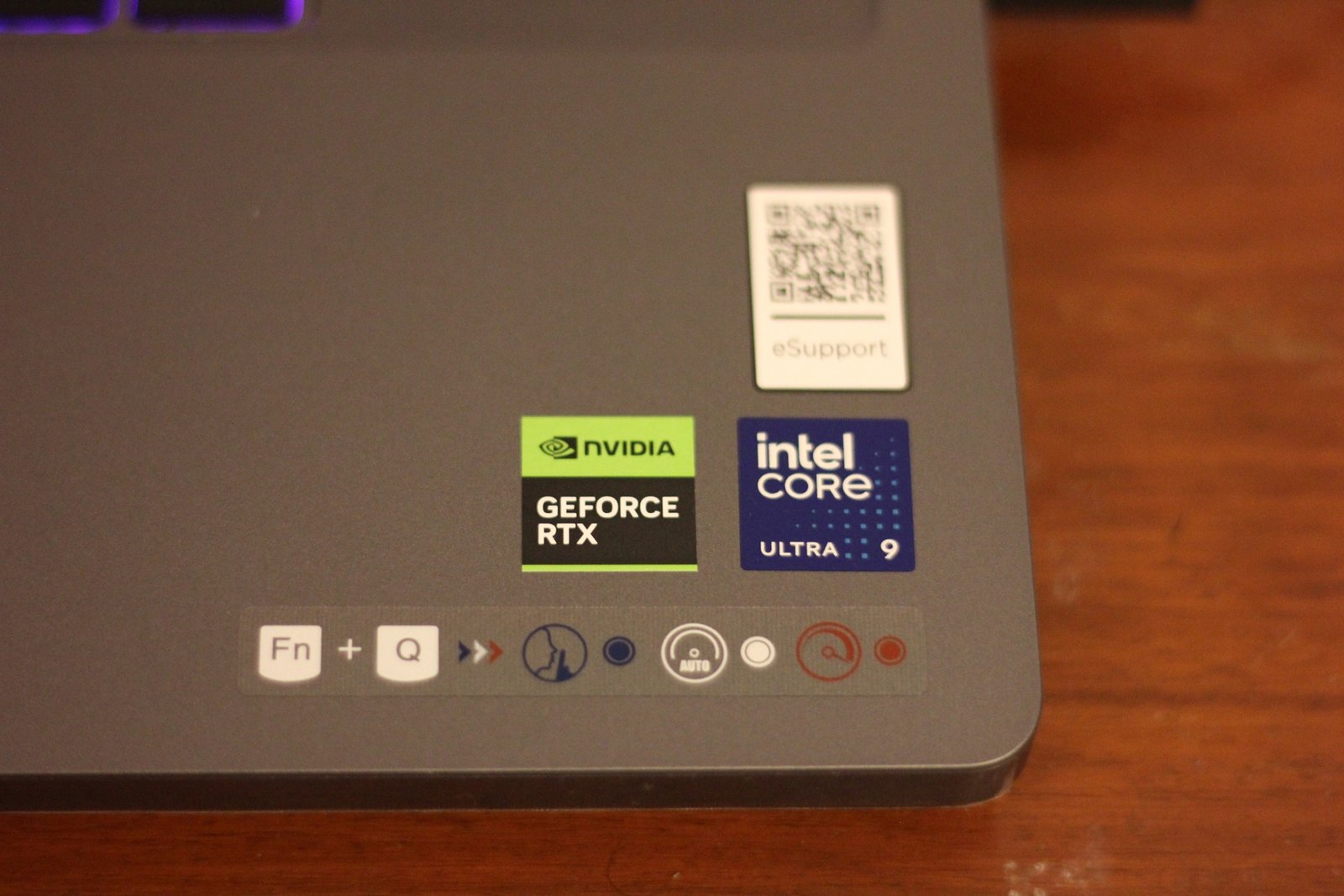
Other than that, I get a full keyboard with NumPad keys on the right side as well. It is a standard English keyboard with an FN key and some additional functions linked to the F1-F12 keys. I like its layout because it is not very confusing, like most gaming laptops that have a cluttered keyboard with shortcuts plastered over every key on the keyboard linked to the Function key. Lenovo Legion 5 16IAX10 has a very clean keyboard, which is excellent for reading and typing. In addition, you get a decent space on the laptop body below the keyboard to rest your wrists as you type. The hardware stickers are tucked on the right corner of the laptop’s body, so I do not have to worry about sweating on them during summer.
Audio:
Lenovo Legion 5 16IAX10 features dual 2W speakers, which are located towards the front-bottom of the laptop. The speakers come from Harman, further optimized by Nahimic Audio, while Realtek drivers manage them. This means that this laptop is not slouching when it comes to audio. If you prefer fidelity, you will need external speakers or a headset, obviously, but these default speakers are excellent if you want to use them. They have clear sound, with dialogue clarity for movies and videos. They are perfect for gaming audio as well if you do not own a headset or external speakers, or if you want to play some games while travelling.

You can enhance audio using the Nahimic Audio software, which comes pre-installed, but you may need to update the drivers after starting your laptop for the first time. This app gives you the freedom to set up surround sound, optimize the sound with equalizers of your choice, and comes with some presets for gaming, movies, and communication. You will only notice a proper difference with external speakers or headphones, but if you have to use the laptop’s own speakers, they will not disappoint you.
I/O Ports
Lenovo Legion 5 16IAX10 comes with an impressive array of I/O ports for using different accessories. On the right side of the laptop, you have two USB-A (USB 5Gbps / USB 3.2 Gen 1) ports, along with an Ethernet (RJ-45) connector and a webcam switch. I was amazed to see the webcam switch because you can slide the switch to permanently cover the webcam, and apps cannot use it in the background. With a simple slide again, you can open the webcam and use it normally. Along with these, you also have a headphone/microphone combo jack (3.5mm), another thing which is quickly becoming a thing of the past.

The left side of the laptop offers relatively modern connectivity solutions. You have an ultra-fast USB-A (USB 10 Gbps / USB 3.2 Gen 2) port, which is always on. You also get a USB-C (USB 10Gbps / USB 3.2 Gen 2), with USB PD 65-100W and DisplayPort 2.1, along with a Thunderbolt Type C connector offering Thunderbolt 4 / USB4 40 Gbps, with DisplayPort 2.1. You also have your HDMI 2.1 port on this side, which supports up to 8K/60Hz, and then finally, you have the power connector near the top of this side. A small light indicates power charging and battery status right next to it.
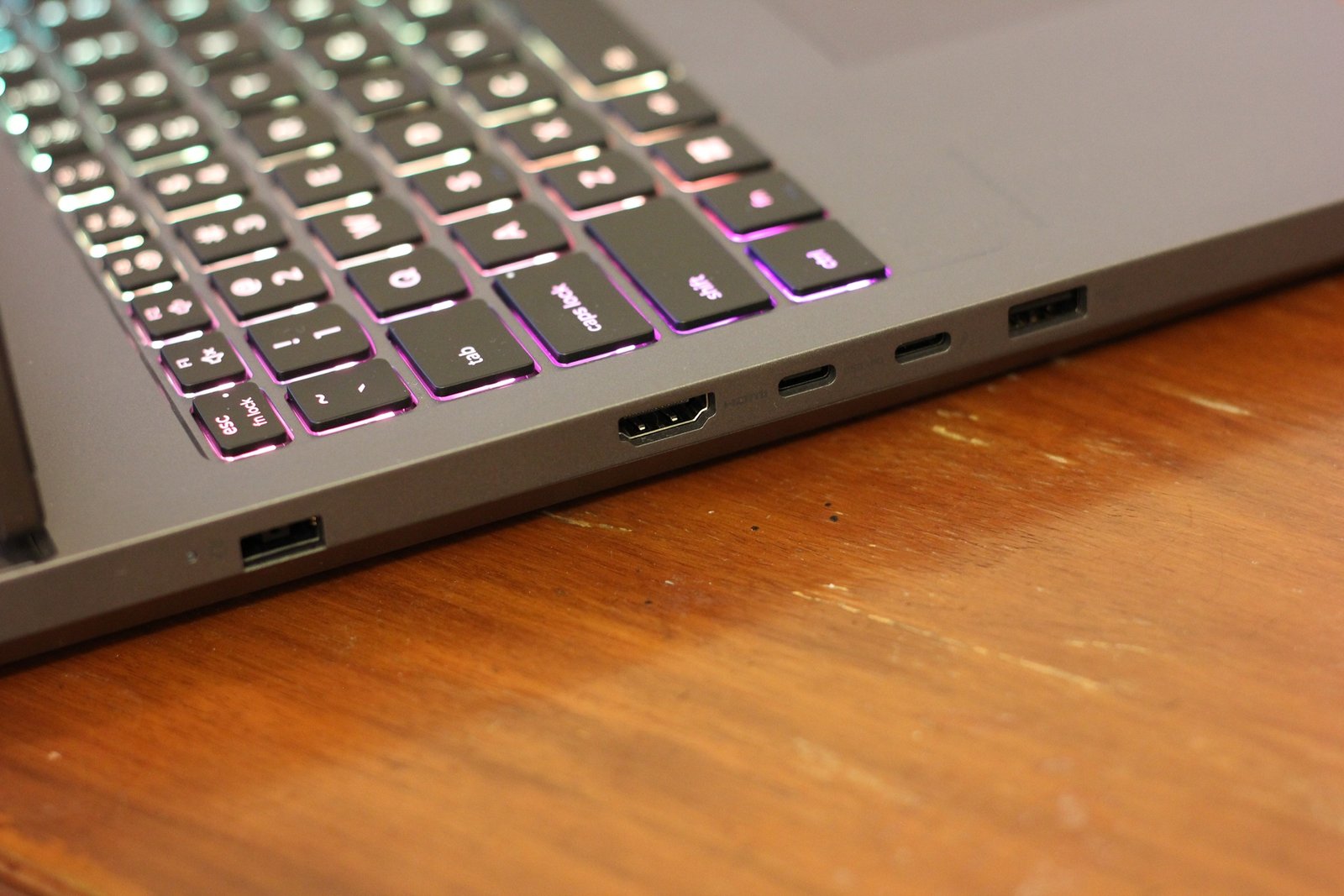 Overall, I have found these I/O ports to be more than enough. I always use an external mouse, and my office SSD is also always connected to my laptop, so even after these two are always connected, I have 4 free slots to connect any additional peripherals. The webcam slider is something that I never expected, and this is the first time I have purchased a laptop that comes with it, so it is a bonus for me. I did not get a chance to use the Thunderbolt 4 port or the HDMI until now, but I am sure they are up to the mark as well. For someone who loves to connect external displays, these two ports will certainly come in handy.
Practicality:
A laptop needs to be practical, and while most gaming laptops are quite heavy, the Lenovo Legion 5 16IAX10 sits at around 2.45 KG, which is roughly 5.4 lbs. While this is not light by any means, it is not overly heavy as well. My heaviest laptop was an HP Pavilion dv6, which I purchased back in 2009, and while it was an amazing machine for its time, its weight was a major downside. I couldn’t carry it comfortably around my university, despite what sort of bag I purchased for it. The Lenovo Legion 5 16IAX10 is also on the weighty side, but its relatively slim profile makes it easier to handle if you move around too much.
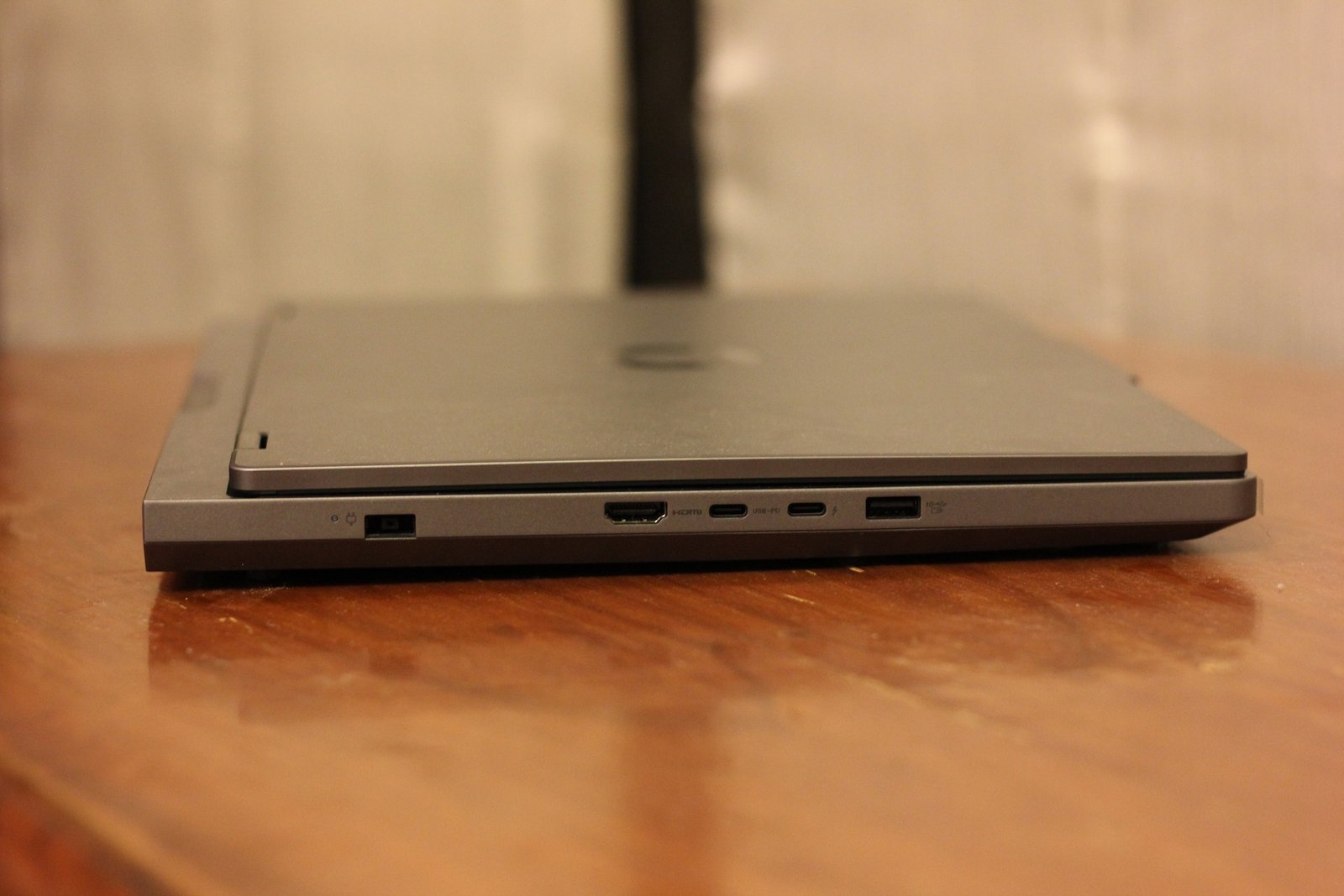
The matte surface means that it is not a scratch magnet, and you do not have to worry about smudges on its surface as well. I have taken this laptop to cafes, offices, and parks, and I have found it easier to use outdoors. The screen brightness is great for working outdoors, too. If you do manage to get some dirty hands on it, the laptop’s body as well as its keyboard is easy to clean with a wipe. You can slide it inside bags and take it out without worrying about scratching its body. You do have to watch out for water and other liquids because it has large air vents on the bottom and the back, and any water near them could be catastrophic.
Design:
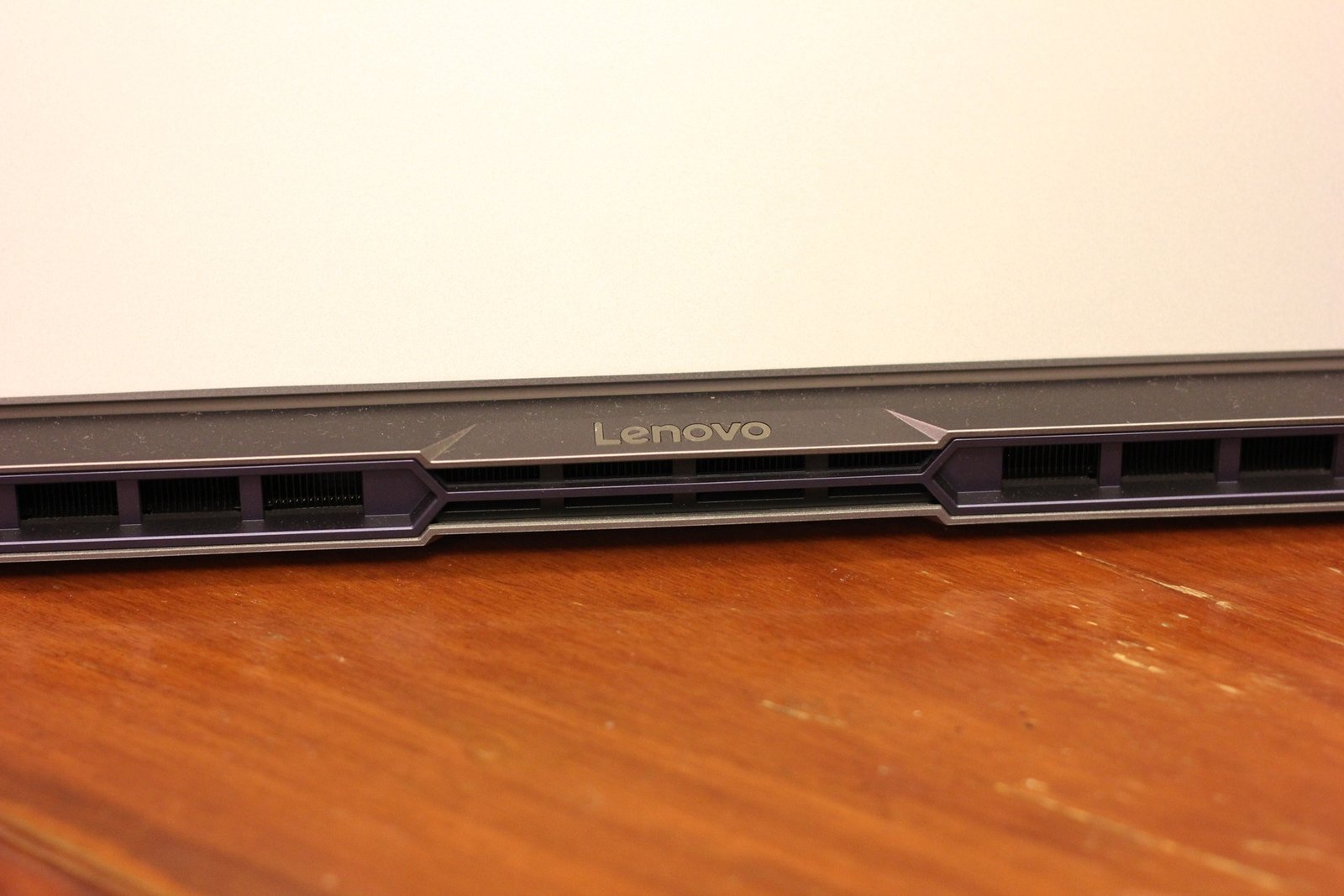
The laptop comes in Storm Grey; it’s the only option. The case material is aluminum at the top and PC-ABS at the bottom. The surface is finished with anodized sandblasting, which gives it a premium matte finish. While it certainly feels premium when you use it but when compared to some similar spec laptops, its design feels a little bland. Behind the screen, you will find a 1-finger gap before the laptop’s body ends, where you will find Lenovo branding, and then you have the dual cooling fans and the large vents for maximum airflow.

At first glance from the front side, the laptop does not feel like a gaming laptop, because apart from the RGB keyboard, nothing really screams gaming about the design. The rear gives a more gaming laptop design because of the vents’ design. There is a light purple design over the vents, which sits very well with the storm grey body. It is so subtle that you only make this purple out if you look very carefully. The top has a simple Lenovo Legion logo on it, and the power button is designed as a Legion logo as well, which has a white light in its grooves.
You get a very small bezel on each side, and the webcam area protrudes a little to accommodate the camera inside it. You get a decent-sized Mylar surface multi-touch touchpad (75 x 120 mm) with integrated left and right clicks. Apart from the keyboard, there is no RGB on any section of the laptop, which gives it a sleeper look. It packs quite a punch on the inside, but on the outside, it feels like a premium work laptop. It is not very curvy or loud like Alienware, MSI, or HP gaming laptops. If you like sleek and premium looks, then this laptop is right up your alley, but if you are looking for something that looks as flashy as its hardware inside, this laptop may disappoint you.

Gaming and Software Performance:
For testing out the true power of my new Lenovo Legion 5 16IAX10, I tried running some visually intensive games and software like Warhammer 40,000: Space Marine 2, Cyberpunk 2077, and Lumion. Since I am a video game journalist, I must run tons of video games on my machines weekly to test them out, whether for benchmarking or reviewing. Since I do not always have access to my main desktop PC, this is where this laptop comes into play. On the sheets, Lenovo Legion 5 16IAX10 boasts solid performance with its powerful Intel Core Ultra 9 processor, an RTX-powered 5060 8 GB GPU, and 32 GB DDR5 RAM, but real performance lies in actual testing, and I am happy to say that this laptop did not disappoint me in any of my tests. Some performance results for different games are detailed below:
Warhammer 40,000: Space Marine 2 – Space Marine 2 is my favorite title of the last year, and it was natural that it was one of the first games I installed and ran on the laptop. The laptop managed to deliver 100 FPS at Ultra settings, running at 2K resolution, with DLSS set to Balanced and 2x Frame Generation.
Battlefield 6 – While this is not a very demanding game, having maximum frames during a competitive shooter benefits the player. Running at native 2K, I managed to squeeze out an average of 110 frames with High settings, DLSS set to Balanced, and 2x Frame Generation.
Warhammer 40,000: Darktide: This is yet another demanding title that comes with sweet Raytracing as well. With this game, the laptop struggled a bit, but I managed to run it at 2K, Medium visuals, RT set to Low, DLSS Balanced, and 2X Frame Generation. It was giving me an average of 85 frames per second.
Cyberpunk 2077: Cyberpunk 2077 is currently the standard for any laptop or desktop benchmarking, and it was only natural that I try to run it on my new laptop. This is certainly a difficult test because this is an immensely demanding game, especially for the GPU. For my first test, I managed to get around 70 frames with 1080p resolution, RT set to full, with DLSS Super Resolution to Auto, and Frame Generation to 2x. The visuals were set to High. Without Frame Generation, the frames dropped to as low as 55 with similar settings. Finally, to really test the game, I turned off Raytracing and switched to Path Tracing, which gave a major dip in frames, with some dropping as low as 30 and even below.
The main reason for failing to achieve higher frames in demanding games is the low VRAM of the RTX 5060. With just 8GB of VRAM available, you have to run the game and dedicate some to the background apps. While I did manage to run Cyberpunk 2077 with everything set to ultra at 2K, the laptop kept loading assets from RAM, and it caused a slight lag after every 2, 3 seconds, making the game unplayable, at least for me. This was a problem for many other games as well, where I was unable to set it to Ultra on 2K resolution because it was running out of VRAM.
This is a tough balance to create because on one hand, you have a 240Hz 2K screen that can deliver excellent visuals, but on the other hand, you only have 8 GB of VRAM available, which is not enough for the most demanding video games. This causes a bottleneck, and hence, the frames get dropped ultimately. I would have loved at least 10 or 12 GB of VRAM, but since those options are not available in this price range, I have to sacrifice either higher frames for visual candy or visuals for higher frames. There is also a slight lag when the laptop is switching from the iGPU to RTX 5060, every time you start a game, if you are using the Hybrid GPU mode. This goes for software as well. Lumion requires at least 10 GB of VRAM for recommended work. While this laptop is more than capable of handling smaller projects without any hiccups, if you throw something big with complex interiors and too many texture files, Lumion starts to lag.
Battery Timing:
Another important aspect for laptops is the battery timing. Lenovo Legion 5 16IAX10 manages to push past 1.5 hours from 80% to 20% battery. This timing can be expanded a little if you charge more than 100% and then drain it all the way down to 0% but for its recommended charge levels, the laptop can easily give you around 1.5 hours of battery life. This is not much, but considering the fact that you have a big screen, an RTX GPU, and a powerful CPU, this battery timing is more than enough.
You can quickly get this back in an hour using the 245W charger provided. Certain battery saving options can give you almost 2 hours of battery life, but with 3D work and proper use with multiple applications open at the same time, and a good screen brightness, you are not looking at any figure greater than 1.5 hours. The battery also comes inside a fixed compartment, so if you are looking to replace it down the road, you will need to open up the complete base and then remove the battery.
Bloatware:
No laptop is free of software that comes bundled with it, and my Lenovo Legion 5 16IAX10 was no different. Straight after my first boot and setting up Windows, I uninstalled the AVG Antivirus. Antivirus software is one of the main causes of issues behind application and video game lag and system performance. I have been relying on Windows Defender since Windows 10, and for my new laptop, I am happy with the default Defender as well. The AVG Antivirus is the only bloatware to go from my new system. Like every brand, Lenovo installs some of its own proprietary software that assists you in different ways. The two Lenovo programs I currently use to manage the laptop include LegionSpace and Lenovo Vantage. With these applications, I have not felt the need to install any third-party applications for managing the hardware.
LegionSpace allows you to view your GPU and CPU’s performance in real time and switch between different pre-built performance presets like Quiet mode or Performance mode. You can also manage how you want to switch between GPUs and what GPU mode you want to run all the time. It also comes with an in-game capture tool that allows you to record gameplay and take screenshots during gameplay. If you are lonely, you can also set it up to cheer for you during some intense gaming sessions.

The Lenovo Vantage is more of a Laptop Manager where you can perform tasks like scanning the system for issues and resolving them. It also helps in keeping the system up to date by updating drivers and giving you notifications on what can be done to improve system performance. I was surprised to see that it updated the BIOS for me as well, which is something that I have always found a little intimidating on a desktop. You can also purchase original Lenovo accessories straight from this software, so it is quite handy to keep it around.
Price:
Depending on the specifications you choose, Lenovo Legion 5 16IAx10 sits between $1,300 – $1,500 for the base variant. My variant with the Intel Core Ultra 9 processor and the GeForce RTX 5060 GPU sits at around $1,600 at Amazon in the USA at the time of publishing this review. You can add extra RAM and storage space to the laptop at checkout with a maximum offering of 64 GB RAM and 8 TB SSD storage, which will set you back a hefty $2,600. With this price range, the Lenovo Legion 5 16IAx10 is definitely on the higher-end range of gaming laptops, but luckily, it comes with the performance to match its price tag. I paid around $1,500 for my laptop.
- Buy it from Amazon
Final Verdict:
Gaming laptops are one of the best ways to enjoy video games on a budget. While hardcore gamers will always pick a desktop because it offers customization, maximum performance, and a lot more modular options for upgrades down the road, laptops can offer a true bang-for-the-buck performance, and the Lenovo Legion 5 16IAx10 is the perfect example of it. While it lacks when it comes to GPU VRAM, its design looks a little bland, and it has an IPS panel, it still delivers an excellent gaming experience on a 2K screen and averages around 100 frames on most of the games out there with Raytracing. For its price, I can easily recommend the Lenovo Legion 5 16IAx10 for hardcore gamers, professionals, and newcomers to PC gaming who are reluctant to just jump into the desktop experience. The Lenovo Legion 5 16IAx10 can manage any demanding work that you can throw at it with ease, be it gaming, architectural work, video editing, or just regular office work.
Disclaimer: A unit of Lenovo Legion 5 16IAX10 was purchased by us for this review. Read our Review Policy.